Punkx Skin: A Handcrafted Display Font for Unique Design Projects
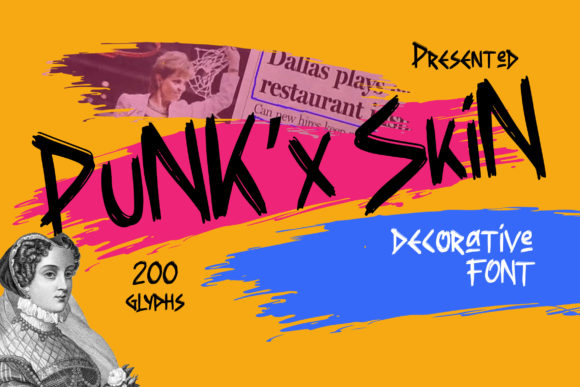
Fonts are more than just a way to present text—they’re a powerful tool that can shape the tone, style, and overall impact of your design. Among the many options available today, Punkx Skin stands out as a hand-crafted display font that brings a natural, edgy, and expressive feel to any project. Whether you're designing a logo, crafting social media content, or working on a creative poster, Punkx Skin can add a unique flair that sets your work apart.
What Is Punkx Skin?
Punkx Skin is a display font designed with attention to detail and a focus on creating a natural, organic look. Unlike generic fonts that lack character, Punkx Skin was crafted by hand, giving it a distinctive texture and visual appeal. It’s ideal for projects that require a touch of rebellion, creativity, or a sense of raw energy.
This font is particularly useful in branding, graphic design, web design, and even personal projects where standing out is key. Its versatility makes it suitable for headlines, banners, posters, and other visual elements that need to grab attention without being overwhelming.
Why People Choose Punkx Skin
Designers and creators choose Punkx Skin because it offers something different. It has a unique aesthetic that blends modern and vintage influences, making it appealing to a wide range of audiences. Here are some reasons why it's becoming increasingly popular:
- Handcrafted Feel: The font gives off a sense of authenticity due to its irregularities and subtle imperfections.
- Versatility: It works well with both digital and print formats, and can be adapted to various design styles.
- Expressive Typography: The characters have a dynamic form that conveys emotion and movement.
- Attention-Grabbing: It's perfect for headlines and titles that need to stand out from the crowd.
Common Mistakes When Using Punkx Skin
While Punkx Skin is an excellent choice, there are common mistakes that people make when using it. These errors can affect the readability, aesthetics, and effectiveness of your design.
Mistake 1: Overusing the Font
One of the biggest mistakes is using Punkx Skin too frequently. Because it's a display font, it should be reserved for headings, logos, or focal points rather than body text. Using it throughout a design can lead to visual clutter and reduce readability.
Better Approach: Use Punkx Skin sparingly and pair it with a clean, legible sans-serif or serif font for body text. This ensures that your message remains clear and easy to read while still maintaining a stylish edge.
Mistake 2: Ignoring Spacing and Kerning
Display fonts like Punkx Skin often have uneven spacing between characters, which can cause issues if not adjusted properly. Failing to consider kerning and tracking can result in a jarring or unprofessional appearance.
Better Approach: Always review the spacing after applying the font. Most design software allows you to adjust kerning manually. If you're unsure, test the font in different sizes and layouts before finalizing your design.
Mistake 3: Not Checking Compatibility
Some users may download Punkx Skin without checking if it’s compatible with their software or platform. This can lead to unexpected formatting issues, especially when exporting or sharing files.
Better Approach: Before downloading, ensure that the font supports the platforms you're using—such as Adobe Creative Suite, Microsoft Office, or web-based tools. Check the font’s license agreement to confirm what you can and cannot do with it.
What to Look For Before Choosing Punkx Skin
If you're considering using Punkx Skin, here are a few things to keep in mind before making your decision:
- Licensing Terms: Make sure you understand the licensing agreement. Some fonts are free for personal use only, while others require a commercial license for professional projects.
- Font Quality: Download the font from a reputable source to avoid corrupted or low-quality versions that could affect your work.
- Design Context: Consider whether the font aligns with the tone and purpose of your project. Punkx Skin may not be the best fit for formal or corporate designs.
- Testing: Always test the font in different scenarios before committing to it. See how it looks at various sizes, on different backgrounds, and with other fonts.
How to Get the Most Out of Punkx Skin
To maximize the benefits of Punkx Skin, follow these tips:
- Use It Strategically: Apply it to headlines, titles, and call-to-action buttons where it can make a strong visual impact.
- Pair It Wisely: Combine it with complementary fonts that balance its boldness and maintain readability.
- Experiment with Layouts: Try different layout styles to see how Punkx Skin interacts with other design elements like images, colors, and shapes.
- Stay Within Legal Boundaries: Respect the font’s licensing terms to avoid potential legal issues, especially when working on client projects or selling products online.
Punkx Skin is a versatile and expressive font that can elevate your design work when used correctly. By avoiding common mistakes and understanding how to apply it effectively, you can create visually striking and professional results that resonate with your audience. Whether you're a beginner or an experienced designer, taking the time to learn about fonts like Punkx Skin can help you produce better, more impactful designs over time.